Collections🔗
Collections are groups of assets in VST Live. The Collections workflow allows you manage these assets efficiently with specific Views and functions in a dedicated area of the Main Window.
Currently, VST Live supports two categories of Collections:
- Media Bay
- Plugins
Interface🔗
Collections are access in the the Right Zone of the Main Window. This is an optional Zone you can choose to enable. Specific asset groups are selectable using their respective icon buttons.
Media Bay🔗
The Media Bay is a repository of content assets for use in VST Live. You can use the Media Bay to conveniently reuse assets within a Project, or share assets between Projects.
Content Types🔗
The content types are:
- Layers
- Parts
- Songs
- Sounds
- Stacks
Repositories🔗
The Media Bay has two repositories: Local and Project.
Local
This is a single location where you wish to store assets available to multiple Projects. Regardless of which Project you have open, the Local repository is the same directory. (See Preferences to specify the directory.)
Project
Assets that are in your current Project, that you have saved, are available in this repository.
Operations🔗
Assets can conveniently be dragged and dropped to and from the Media Bay.
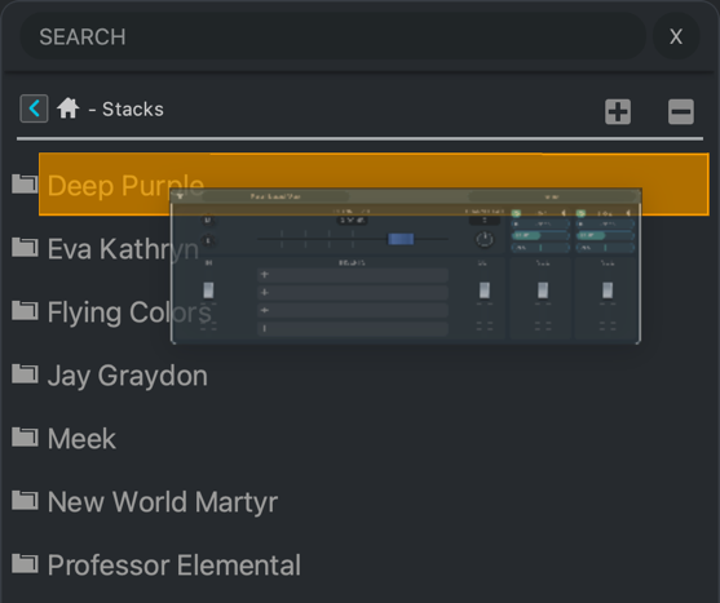
Dragging Assets from a Zone into the Media Bay
To copy an asset to the Media Bay, choose the matching asset type in the Media Bay, and drag the element from the respective Zone to the Media Bay. The destination will glow orange to indicate you can release the cursor.
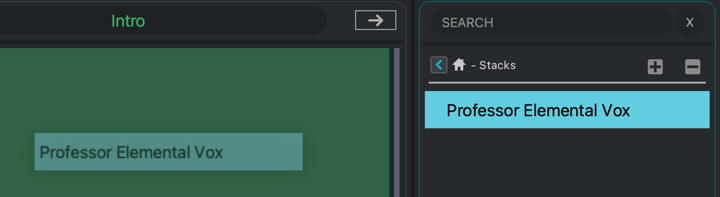
Dragging Assets from the Media Bay into a Zone
To drag an asset form the Media Bay to a Zone, first ensure you have the appropriate View selected in the destination Zone (for the asset type). Drag the asset into the View; it will turn green to indicate that you can release the cursor.
Folders🔗
You can create or delete folders in either repository using the Plus/Minus icons in the Media Bay’s Toolbar.
Plugins🔗
The Plugins View collects assets related to plugins (VST effect and virtual instrument plugins).
Asset Types🔗
The types of assets stored are:
- VST Virtual Instruments
- VST Plugins
- (Factory) Presets
- User Presets
- Controls
Operations🔗
Drag and drop asserts from the Right Zone to the destination element in your Project.